Triggers
Unable to create trigger
Check the error message — the connected account might not have sufficient permissions or the required OAuth scopes. Ensure the user has authenticated with the necessary scopes for the trigger.
Not receiving payloads
- Polling triggers (e.g., Gmail): These check for new events on an interval you configure. For Composio managed auth, intervals below 15 minutes are not supported.
- Webhook URL: Ensure your URL is publicly accessible and returns a
2xxstatus code. - Trigger status: Verify the trigger is enabled, not disabled.
- Logs: Check the trigger logs in the dashboard for delivery attempts and errors.
Webhook endpoint issues (your-own OAuth on Slack, Notion, etc.)
These only apply when you've configured the webhook endpoint yourself — see Configuring the webhook endpoint. With Composio-managed OAuth apps, the endpoint is provisioned automatically and these issues don't apply.
400on every provider request. The signing secret on the webhook endpoint is missing or wrong.PATCHthe endpoint with the secret before pointing the provider's dashboard at the URL — Slack auto-disables endpoints after ~36 hours of consecutive failures.400on trigger upsert. The OAuth app'sclient_iddoesn't have a webhook endpoint in this project. Create one viaPOST /api/v3.1/webhook_endpoints.verified_atis null on the endpoint. The provider hasn't completed the URL verification handshake yet. Re-save the URL in the provider's dashboard; for Slack, click Save Changes on Event Subscriptions.- DMs / private channels / reactions don't fire on Slack. The
app_tokenis missing on the endpoint.PATCHthe endpoint with anxapp-token that has theauthorizations:readscope. See Configuring the webhook endpoint for which Slack triggers require this. - Replay-window rejections. For providers that sign a timestamp (Slack), requests outside the allowed skew window are rejected. Make sure the system posting the events isn't replaying old payloads.
Type errors with trigger payloads
Use getType() / get_type() to inspect the exact payload schema for a trigger type. This shows you the fields and types you should expect.
Reporting issues
When contacting support, include:
-
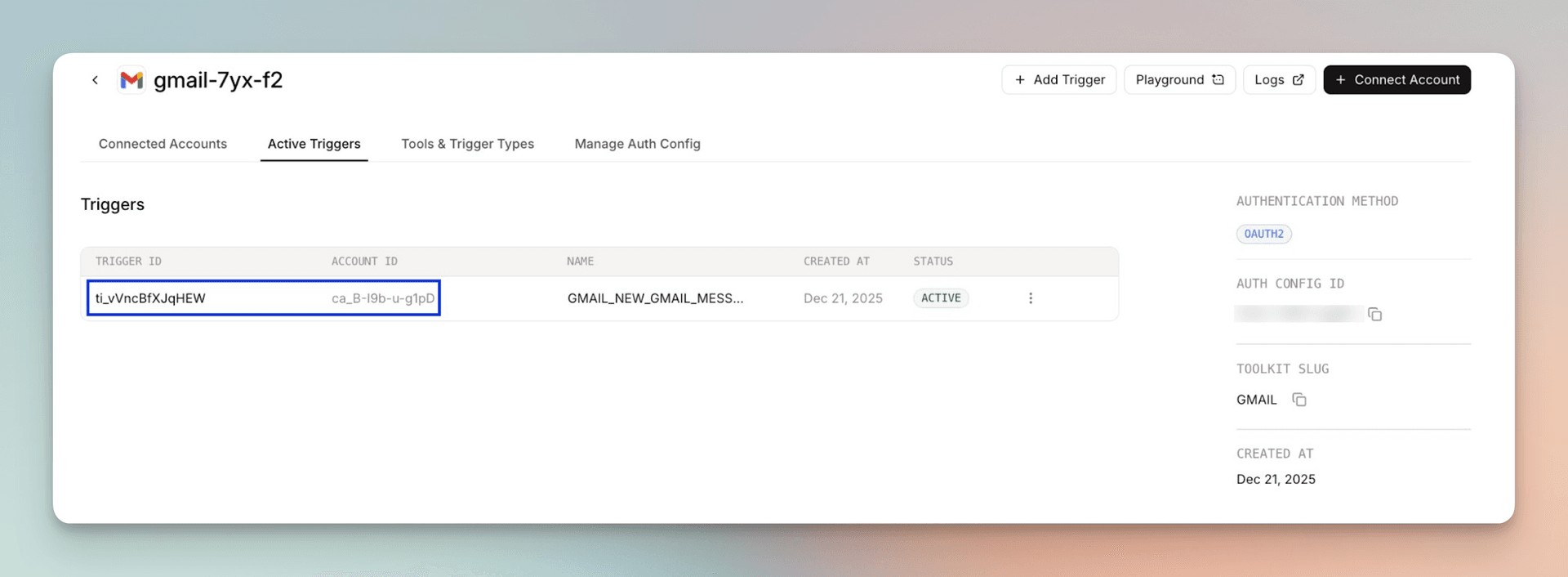
Trigger ID and connected account ID — find these under Active Triggers in the dashboard:
-
Error message and reproduction steps
Getting help
- Email: support@composio.dev
- Discord: #support-form